 Grade
Grade Dive into coding without using a computer – yes, you read that right! This project explores how computers use binary code to perform the tasks humans “tell” them to do, and enables kids to translate their names into binary. Once they’ve got their code, they’ll use it to make awesome binary jewelry!
Watch The Video
https://youtu.be/-oBBz3nI0XQ
Required Materials
- 70 stringable beads (two different colors, approximately 35 of each)
- string
- Binary Decoder Sheet
- 8-Bit Worksheet
- marker
- scissors
- necklace clasp
- key chain
Step-By-Step Instructions
Step 1
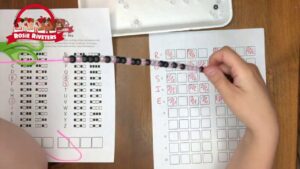
Write your name vertically along the left hand side of the 8-bit worksheet printable. Align each letter with a numbered line.
Step 2
Use the binary decoder key printable to identify the binary sequence for each letter in your name and record the code on the 8-bit worksheet.
Step 3
Place the corresponding beads onto the coded 8-bit worksheet.
Step 4
String the beads from left to right for each letter onto the string.
Step 5
Tie off the string to your desired length. Strings with longer names make great necklaces, and shorter ones are great bracelets.
Resources in This Lesson
Resource 1
Ever wonder how to introduce computing without a lot of screen time? We’ve got the answer! Read about Ada Lovelace, the first computer programmer, code a “robot” to make a peanut butter and jelly sandwich, and transform your name into binary code with your Hands-on STEM Binary Code Kit.
Pre-Built Lesson: Coding and Computing
https://handsonstem.rosieriveters.com/resources/pre-built-lesson-coding-and-computing/
Items Available to Purchase
-
Binary Wearable
$10
https://www.rosieriveters.com/shop#!/Binary-Wearable/p/212364106/category=0

Ever wonder how to introduce computing without a lot of screen time? We’ve got the answer! Read about Ada Lovelace, the first computer programmer, code a “robot” to make a peanut butter and jelly sandwich, and transform your name into binary code. It’s all below in this coding lesson plan!
Resources in This Lesson
Resource 1
Nominate someone to “become” a robot in this hilarious group activity that emphasizes the need for specificity in coding!
Rosie Explores Coding
https://handsonstem.rosieriveters.com/resources/rosie-explores-coding/
Resource 2
For our book, we’re reading Who Says Women Can’t be Computer Programmers?, which explores the life of Ada Lovelace, the world’s first computer programmer.
Rosie Reads Who Says Women Can’t Be Computer Programmers?
https://handsonstem.rosieriveters.com/resources/rosie-reads-who-says-women-cant-be-computer-programmers/
Resource 3
Learn how to code without any screen time in this hands-on activity that translates your name – or any word – into binary code jewelry!
Rosie Makes Binary Jewelry
https://handsonstem.rosieriveters.com/resources/rosie-makes-binary-jewelry/
Resource 4
Continue learning and exploring with some of these tried and tested Rosie Recommends activities from other STEM educational resources.
Rosie Recommends Coding Activities!
https://handsonstem.rosieriveters.com/resources/rosie-recommends-coding-activities/